
View Your ED Visit Details on myUCLAhealth
Starting May 19, 2026, you can view details of your emergency department (ED) visit on myUCLAhealth. The app may not show all details right away, such as provider notes or test results under review. The app will update with details as your care continues.
About Your Emergency Department Visit
Being in the ED can feel stressful. myUCLAhealth Bedside Mobile helps patients and their loved ones stay informed and connected. During an emergency visit, you can use a smartphone, tablet or computer to access this feature.
myUCLAhealth Bedside Mobile updates automatically when a patient arrives at the ED. You will receive a text message or email with a link to Your Emergency Visit page. You can also view your visit by signing into the MyChart app.
Access for Family Members and Caregivers
Approved family members and caregivers can also view this information, even if they can’t be with you in person.
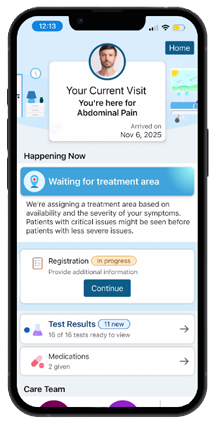
What Visit Details You Can See
- The reason for your ED visit (for example, abdominal pain or injury)
- Updates on your care progress, such as Waiting for Treatment Area or Provider Assessment
- Your care team, including staff roles and short bios
- Lab results and past results for comparison, when available
- Medications given during your visit
Find Your Visit Details
- Sign in to the MyChart app on your phone, tablet or computer.
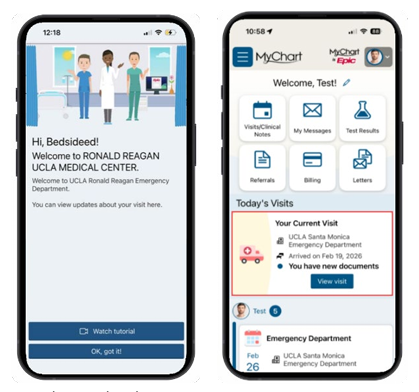
- The first time you sign in during an ED visit, you may see the Welcome to Your UCLA Health Emergency Department tutorial.
- Select Watch Tutorial for guidance or OK, got it! to continue.
- If you leave Your Emergency Visit page:
- Go to the Home screen.
- Under Today’s Visits, you will find Your Emergency Visit.
- Select View Visit.
*The myUCLAhealth App is powered by MyChart® licensed from Epic Systems Corporation, © 1999-2025.
Need Help?
Call myUCLAhealth 24-hour technical support at 855-364-7052. They can help you access your visit info, log in or activate your account.